【無料】【VRChat】【MA対応】Argentum Vortex|渦巻き歪みシェーダー【PC用】
- ダウンロード商品¥ 0無料ダウンロードArgentum_Vortex_v1.2.0.zip(141 KB)Argentum_Vortex_v1.2.0.zip
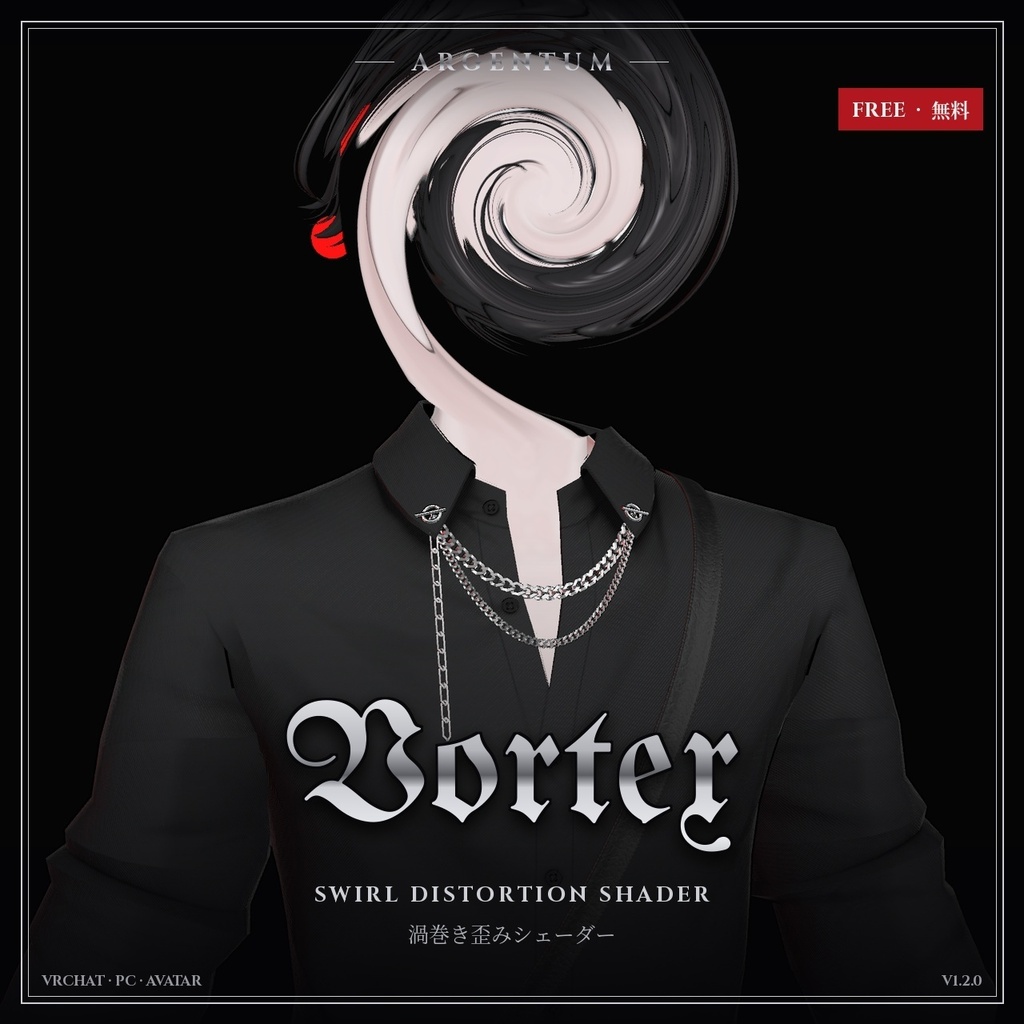
顔を渦状にねじ曲げます。メッシュ越しにも、アバター自体にも。無料配布の入門用シェーダーです。 ■ 特長 ・Modular Avatarプレハブ付き:アバターにドラッグするだけでメニュートグルが使えます ・新しいVortex Material:渦をアバター自体の顔に。ほかの人にも見えます。ワンクリックの変換ツールが渦を配置し、マテリアルをコピーしてメニュートグルを追加 ・ねじれ量、減衰、膨張/収縮を調整可能 ・継ぎ目なくループする連続回転と、揺れアニメーション(任意) ・オブジェクトのピボットを中心に回転(中心位置は移動可能) ・半径はメートル指定、VRでも縦横比が正確 ・Avatar Only:ほかの人には効果が頭にだけかかって見え、後ろの景色にはかからないので、どのワールドでも頭のまわりに輪郭が出ません ■ Vortex Material(アバター用マテリアル) ・渦をアバター自体の顔に。ミラーやVRChatカメラを含め、ほかの人にも見えます。顔がねじれ、瞳が回ります。渦はテクスチャの上にあるので、動いてもずれません。設定はスクリーン版と同じです。 ・ワンクリックで導入:Tools > Argentum > Vortex Material — Convert Avatar Materials が渦を顔(または胸)に自動で配置し、Vortex Material版のコピーを作り(元のマテリアルは変更しません)、Modular Avatarのメニュートグル(同期1ビット)を追加します。見た目はSwirl、Hypnoticの2種類。 ・PC専用。カスタムシェーダーがブロックされている場合は、渦のない通常のテクスチャで表示されます。動かすのは形ではなくテクスチャで、目や唇など描き込みのある部分ほどはっきり出ます。 ■ こんな用途に 渦巻き顔のネタ、ポータル、めまいの演出。 ■ 対応環境 ・Unity 2022.3.22f1(VRChatの現行バージョン)、ビルトインレンダーパイプライン ・VRChatアバター用、PC専用(VRChatはQuest / Androidのアバターでカスタムシェーダーを許可していません) ・アバターを問わず使用でき、他のシェーダーにも依存しません ・シングルパスステレオのVR、ミラー、VRChatカメラに対応 ・ドラッグ&ドロップのプレハブ/トグルにはModular Avatarが必要です(未使用の場合の手動セットアップもREADMEに記載) ■ 内容物 ・Argentum_Vortex_v1.2.0.unitypackage ・Argentum/Vortex、Argentum/Vortex Material シェーダー ・Modular Avatarプレハブ:アバターにドラッグするだけでExpressionメニューのトグルが付きます(Swirl(渦)) ・ワンクリックセットアップツール(Tools > Argentum > Vortex Material — Convert Avatar Materials)。Modular Avatarのトグルも自動で追加 ・プリセットマテリアルとメニュー用アイコン ・README(英語・日本語)、利用規約、更新履歴 ■ 負荷 低:1ピクセルにつき1サンプル Vortex Material:画面コピーなし。メッシュやマテリアルスロットを増やさないため、パフォーマンスランクは変わりません。 ■ アップデート 購入者は無料でアップデートを受け取れます。BOOTHのライブラリから再ダウンロードしてください。 画像のアバター:紗夜-Suzuya-(JUSTDUCKY様)※アバターは付属しません ──────────────────── English ──────────────────── Argentum Vortex: Swirl Distortion Shader (Free) [VRChat / PC / Modular Avatar] Twist a face into a spiral, through a mesh or on the avatar itself. Free, and a good first look at the line. ■ Features ・Modular Avatar prefab: drag onto your avatar for a menu toggle ・New Vortex Material: the swirl on your avatar's own face, seen by others too. A one-click converter places it, copies your materials and adds a menu toggle ・Twist, falloff, and bulge / pinch controls ・Continuous spin that loops seamlessly, plus an optional wobble ・Spins around the object's pivot, with an offset you can move ・Radius set in meters, aspect-correct in VR ・Avatar Only: others see the effect on your head, not on the world behind it, so there's no outline around your head in any world ■ Vortex Material (avatar material) ・The swirl on your avatar's own face, so others see it too, in mirrors and the VRChat camera: the face twists and the eyes turn. It lives in the texture, so it never slides off as you move. Same controls as the screen version. ・One-click setup: Tools > Argentum > Vortex Material — Convert Avatar Materials places the swirl on the face (or chest) automatically, makes Vortex Material copies of your materials (your originals are never changed) and adds a Modular Avatar menu toggle (1 synced bit). Looks: Swirl, Hypnotic. ・PC only. With custom shaders blocked, viewers see your textures without the swirl. The swirl moves texture, not shape, and shows most on painted detail such as eyes and lips. ■ Use it for Swirl-face edits, portals, dizziness effects. ■ Compatibility ・Unity 2022.3.22f1 (VRChat's current version), Built-in Render Pipeline ・VRChat avatars, PC only. VRChat does not allow custom shaders on Quest / Android avatars. ・Works with any avatar and doesn't depend on any other shader. ・Supports single-pass stereo VR, mirrors and the VRChat camera. ・Modular Avatar is needed for the drag-and-drop prefab / toggle. Manual setup without it is covered in the README. ■ What's included ・Argentum_Vortex_v1.2.0.unitypackage ・Argentum/Vortex and Argentum/Vortex Material shaders ・Modular Avatar prefab: drag onto your avatar for an expression-menu toggle (Swirl) ・One-click setup tool (Tools > Argentum > Vortex Material — Convert Avatar Materials) that adds a Modular Avatar toggle ・Preset materials and a menu icon ・README (English / Japanese), terms of use, changelog ■ Performance Low: one sample per pixel Vortex Material: no screen copy. It adds no meshes or material slots, so your Performance Rank doesn't change. ■ Updates Free for buyers. Re-download from your BOOTH library. Avatar in the images: 紗夜-Suzuya- by JUSTDUCKY (not included) ━━━━━━━━━━ ▼ セット / Bundle Argentum FX Complete:13種のシェーダーを1パッケージに(¥6,500。単品合計は¥9,500) All 13 shaders in one package (¥6,500; ¥9,500 if bought separately) https://argentumdesigns.booth.pm/items/9056024 ▼ 最新情報 / Updates https://x.com/argentumdesigns
Terms of Service
・○ アップロードするアバター・ワールドでの使用(個人・商用、配信・動画を含む) ・○ 自分用の改変。依頼で制作したアバターへの使用と代理アップロード(ファイルを渡さない場合) ・× ファイルの再配布・転売(改変の有無を問わず、アバターやワールドのパッケージへの同梱を含む) ・規約の全文はダウンロードデータに同梱しています ──────────────────── ・OK: use on avatars and worlds you upload, personal or commercial, including streams and videos. ・OK: modify for your own use; use on commissioned avatars you upload for a client, as long as the files aren't handed over. ・Not OK: redistributing or reselling the files, modified or not, including inside avatar or world packages. ・Full terms are included in the download.
Update information
・1.2.0 (2026-11-07) - 新機能:Vortex Material(Argentum/Vortex Material)。効果をアバター自体のマテリアルにかけ、ミラーやカメラを含めてほかの人にも見えます。ワンクリックの変換ツール(Tools > Argentum > Vortex Material — Convert Avatar Materials)がマテリアルのコピーを作り(元のマテリアルは変更しません)、Modular Avatarのメニュートグル(同期1ビット)を追加します。渦の位置はツールが顔(または胸)に自動で配置します。プリセット:Swirl、Hypnotic。PC専用です。 - Avatar Only:ボリュームの外にいる人には、効果が頭にだけかかって見えるようになり、頭のまわりの輪郭が出なくなりました。どのワールド・ミラー・カメラでも働きます。初期値はオンで、マテリアルでオフにすると以前の見た目に戻せます。 ・1.1.0 (2026-11-03) - 「Spin」設定を追加:排水口に吸い込まれる水のように渦が回り続けます。継ぎ目なくループし、ねじれが溜まってノイズになることはありません。プレハブの「Swirl」はゆっくり回転するようになりました。 - Wearer Sees It(装着者にも表示)の設定を追加(顔用の効果のため初期値はオフ):オンにすると自分の視界にも効果がかかります。ほかの人からの見え方は変わりません。 - マテリアルの「Cull」設定は「Wearer Sees It」に置き換わったため削除しました。 ・1.0.0 (2026-10-27): 初回リリース ・1.2.0 (2026-11-07) - New: Vortex Material (Argentum/Vortex Material). The effect on your avatar's own materials, seen by others too, in mirrors and cameras. A one-click tool (Tools > Argentum > Vortex Material — Convert Avatar Materials) makes copies of your materials (originals untouched) and adds a Modular Avatar menu toggle (1 synced bit). The tool places the swirl on the face (or chest) for you. Presets: Swirl, Hypnotic. PC only. - Avatar Only: people outside the effect volume now see the effect only on your head, not on the world behind it, so the outline around your head is gone. Works in every world, mirror and camera. On by default; turn it off on the material for the old look. ・1.1.0 (2026-11-03) - New Spin setting: the swirl keeps turning like water down a drain, looping seamlessly without winding itself into noise. The prefab's Swirl look now spins slowly. - Wearer Sees It setting added (off by default for this face effect): turn it on to see the effect in your own view as well. Everyone else sees it exactly as before. - The Cull setting was removed from the material; Wearer Sees It replaces it. ・1.0.0 (2026-10-27): First release.